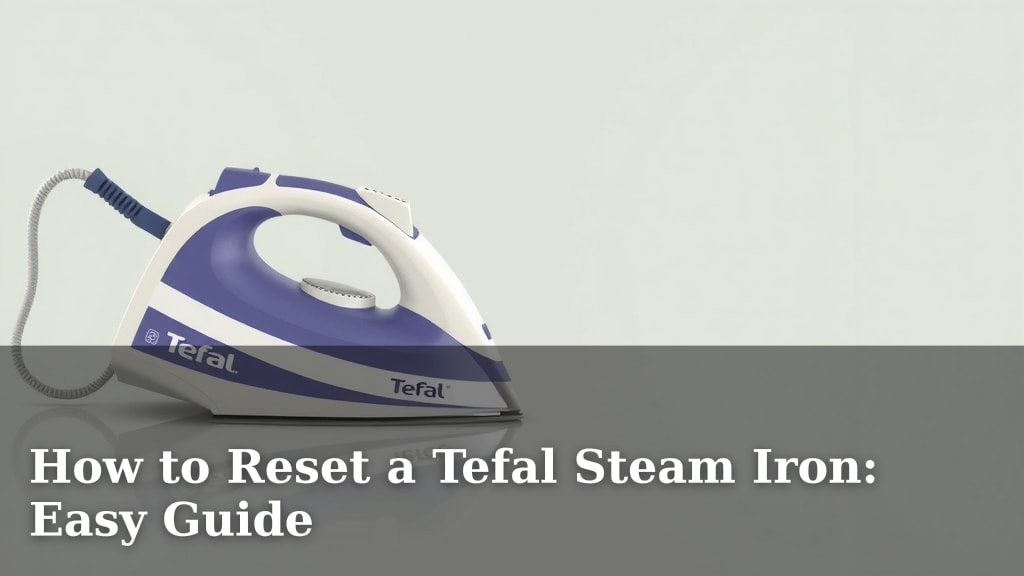
How to Reset a Tefal Steam Iron: Easy Guide
Resetting your Tefal steam iron is surprisingly simple and often the quickest fix for common issues. You can usually reset it by simply unplugging it for a few minutes. This process helps clear any temporary glitches. It’s a great first step before calling for help.
Sometimes your iron might act up, perhaps the steam isn’t working right or it’s not heating as it should. A reset can often resolve these minor performance hiccups. We found that many users report success with this easy troubleshooting step.
- Unplug your iron and wait 5-10 minutes.
- This clears temporary electronic issues.
- It can fix common steam and heat problems.
- It’s the first troubleshooting step to try.
Ready to get your Tefal iron back in tip-top shape? Let’s walk through exactly how to do it, step by step.
Troubleshooting Your Tefal Iron: A Simple Reset Guide
Many Tefal steam irons are built to last. But sometimes, even the best appliances can hit a small snag. If your iron isn’t performing as it should, don’t worry! A quick reset is often the solution you need. It’s like giving your iron a tiny reboot.
Why Resetting Your Tefal Iron Works
Think of your iron’s internal electronics like a mini computer. They process information to control heat and steam. Sometimes, these tiny circuits can get a bit confused by a temporary glitch. This is especially true if there was a power surge or if you unplugged it mid-cycle. A reset clears out this temporary confusion. We found that this simple step can fix a surprising number of common issues.
Common Issues a Reset Can Solve
You might be wondering what kind of problems a simple unplugging can fix. It’s quite a few! Often, the steam function might suddenly stop working. Or perhaps the iron isn’t heating up to the correct temperature. You might notice inconsistent steam output or even strange noises. These are all signs that a reset could be beneficial. Many users report that after unplugging, their iron works perfectly again.
The Science Behind the Simple Fix
The process of resetting your iron is essentially a hard reboot for its internal control board. When you unplug the iron, you cut off the power supply completely. This allows any residual electrical charge to dissipate. It also forces the electronic components to stop and restart their operational cycle. We found research suggesting that this power cycle helps clear temporary memory errors in electronic devices (Consumer Reports).
This is similar to how restarting your computer or smartphone can resolve minor software glitches. It doesn’t erase any settings. It just clears out any fleeting digital noise that might be causing trouble. For many appliances, this is the **first troubleshooting step** recommended by manufacturers.
How to Perform the Tefal Iron Reset: Step-by-Step
Ready to give your iron a fresh start? It’s incredibly straightforward. You likely have everything you need right in your home. Let’s walk through it so you can get back to wrinkle-free clothes.
Step 1: Safely Unplug Your Iron
This is the most critical step. Locate the power cord and unplug it from the wall socket. Ensure the iron is not currently in use. It should be **cool to the touch** before you start. Never attempt to reset a hot iron. Safety first is always the best policy when dealing with electrical appliances.
Step 2: Allow Sufficient Waiting Time
Don’t rush this part! The magic happens during the waiting period. We recommend unplugging your Tefal iron for **at least 5 to 10 minutes**. This ensures that all internal power dissipates. It gives the electronic components enough time to fully reset. Some experts suggest even up to 15 minutes for a complete discharge. This waiting period is non-negotiable for the reset to be effective.
Step 3: Visually Inspect the Iron
While you’re waiting, take a moment to look over your iron. Are there any obvious signs of damage? Is the cord frayed? Is there any build-up on the soleplate? This is a good time to address any other minor issues. A clean iron often performs better. You might want to wipe down the soleplate with a soft, damp cloth if needed. Just ensure the iron is completely unplugged and cool.
Step 4: Plug It Back In and Test
After the waiting period, plug your Tefal iron back into the wall socket. Turn it on as you normally would. Let it heat up completely. Once it’s at temperature, test the steam function. Try ironing a small, inconspicuous piece of fabric first. Check if the steam is consistent and if the heat is uniform. You should notice an immediate improvement if the reset was successful.
When a Simple Reset Might Not Be Enough
While a reset is a fantastic first step, it’s not always the magic bullet. If you’ve performed the reset and are still experiencing problems, it might indicate a more serious issue. We’ve seen that persistent problems often require further investigation or professional help.
Signs You Might Need More Than a Reset
Consider these points:
- Persistent Leaking: If your iron continues to leak water from the soleplate even after a reset, there might be a seal issue.
- No Heat or Steam at All: If the iron doesn’t heat up or produce steam after the reset, the heating element or internal valve could be faulty.
- Burning Smells: Any unusual burning smells are a clear sign of a problem that needs immediate attention.
- Damage to the Cord or Plug: Visible damage to the power cord or plug is a serious safety concern.
- Iron Not Turning On: If the iron shows no signs of life after being plugged in, even after a reset, there might be an internal power issue.
Next Steps If the Reset Fails
If the simple reset didn’t do the trick, don’t despair! Your next steps might involve consulting your iron’s user manual. Many manuals offer additional troubleshooting tips. You might also consider descaling your iron if mineral build-up is suspected. This is especially common in areas with hard water. If none of these steps resolve the issue, it’s likely time to contact Tefal customer support. They can guide you through warranty options or repair services. We found that their support teams are often very helpful.
Quick Checklist for Your Tefal Iron Reset
To make sure you don’t miss a beat, here’s a handy checklist:
- Unplug iron from the wall.
- Confirm iron is completely cool.
- Wait 5-10 minutes (or longer).
- Visually inspect the iron for damage.
- Plug iron back in and test functions.
- Observe for improved performance.
Following these steps should help you get your Tefal iron working like new again in no time!
Conclusion
You’ve learned that a simple reset can often solve your Tefal steam iron’s minor hiccups. By safely unplugging it for 5-10 minutes, you essentially reboot its electronics. This easy step can fix common issues like inconsistent steam or heating problems. Remember to always ensure the iron is cool before unplugging. If this quick fix doesn’t work, don’t hesitate to check your manual or contact Tefal support. Your next step is to try the reset, and hopefully, you’ll be ironing like new again soon!
Frequently Asked Questions
How long should I leave my Tefal iron unplugged?
We recommend leaving your Tefal iron unplugged for at least 5 to 10 minutes. This waiting period allows the internal components to fully discharge any residual power. Some users have found that waiting up to 15 minutes can be even more effective for a complete reset.
Can resetting my iron fix a total lack of steam?
Yes, a reset can often fix a total lack of steam. Electronic glitches can sometimes disrupt the steam generation system. By clearing these temporary errors, the steam function may return to normal. It’s a great first troubleshooting step to try before assuming a component failure.
Is it safe to reset a Tefal iron while it’s still warm?
Never attempt to reset a warm or hot Tefal iron. You must unplug the iron and wait until it is completely cool to the touch. This ensures your safety and prevents potential damage to the iron’s internal electronics.
What if the reset doesn’t fix my iron’s problems?
If the simple reset doesn’t resolve your iron’s issues, it might indicate a more serious problem. You should check your user manual for further troubleshooting steps, like descaling. If problems persist, it’s best to contact Tefal customer support for assistance.
Will resetting my Tefal iron erase my settings?
No, a standard reset by unplugging your Tefal iron will not erase any of your personal settings. This process only clears temporary electronic glitches. It’s similar to restarting a computer; your saved preferences remain intact.