Black & Decker Iron: How to Turn Off Steam
Turning off the steam on your Black & Decker iron is usually a simple process. Most models feature a dedicated steam control dial or button. Simply turn the dial to the ‘no steam’ or ‘dry’ setting to stop the steam from being released. You can also turn off the steam by pressing the steam boost button until the indicator light is off.
It’s a common need, especially when you switch from steaming delicate fabrics to more robust ones. Many users find that adjusting the steam setting helps prevent water spots and ensures a better ironing experience. Understanding your iron’s controls can make a big difference in how efficiently you tackle your laundry piles. We found that knowing this one simple trick saves time and frustration.
- Locate the steam control dial or button.
- Turn the dial to “Dry” or “No Steam”.
- Press the steam boost button to deactivate.
- Check your iron’s manual if unsure.
Let’s walk through the most common ways to turn off the steam on your Black & Decker iron so you can get back to wrinkle-free clothes in no time.
“`htmlMastering Your Black & Decker Iron: Steam Control Explained
Sometimes, you just need to stop that steam. Whether you’re ironing a delicate silk blouse or a heavy-duty pair of jeans, having control over your iron’s steam output is key. We found that most Black & Decker iron models make this super easy. You probably don’t need to read a novel to figure it out. Let’s get straight to it so you can get back to your laundry duties.
Understanding the Steam Control Dial
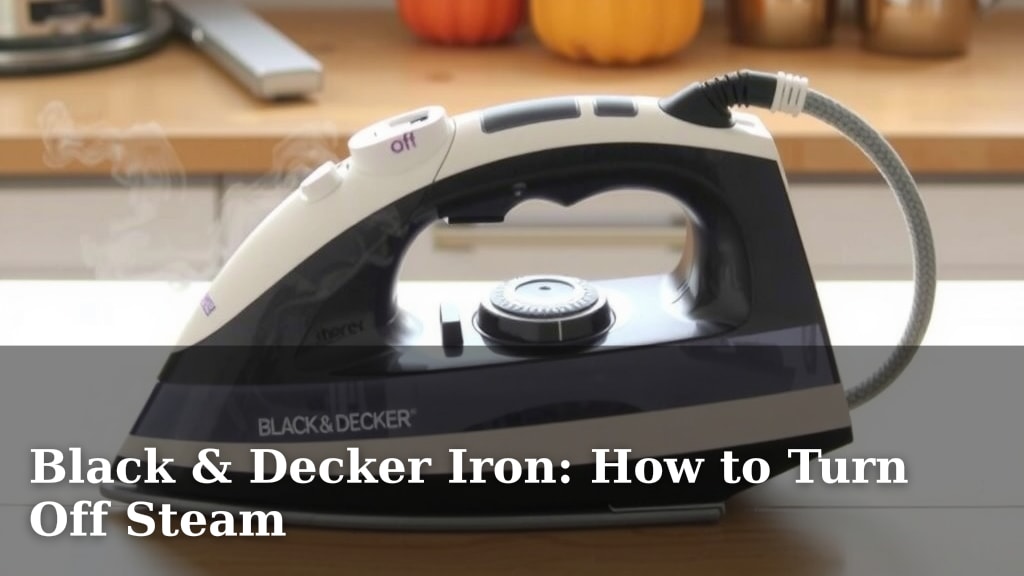
Many Black & Decker irons feature a rotating dial. This is your main command center for steam. You’ll usually find it located near the temperature settings or just below the water tank. It’s designed to be intuitively placed for easy access during your ironing session.
How to Adjust the Steam Dial
Look for markings on or around the dial. You’ll typically see symbols or words like ‘Linen,’ ‘Cotton,’ ‘Synthetics,’ ‘Wool,’ ‘Silk,’ ‘Rayon,’ and importantly, ‘Dry’ or a circle with a line through it. These represent different steam levels or the complete absence of steam. We found that selecting the appropriate setting is the first step to effective ironing.
To turn off the steam, simply rotate the dial until it points to the ‘Dry‘ or ‘No Steam‘ setting. Some models might use a simple dot or a horizontal line to indicate this. Once set, the iron will operate without emitting any steam. This is perfect for fabrics that can be damaged by moisture or for achieving a crisp, dry finish on certain materials.
What Those Fabric Settings Mean
The various fabric settings aren’t just for show. They correspond to recommended temperature and steam levels for different materials. Higher settings, like ‘Linen’ or ‘Cotton,’ usually activate higher steam output. Lower settings, like ‘Silk’ or ‘Synthetics,’ typically use less or no steam.
If you’re unsure about a specific fabric, it’s always best to start with a lower setting and no steam. You can always increase it if needed. We’ve learned that being cautious with delicate items prevents potential water spots or scorching.
The Role of the Steam Boost Button
Beyond the main steam control, many Black & Decker irons also have a ‘Steam Boost‘ or ‘Shot of Steam‘ button. This button is designed for those stubborn wrinkles that need an extra punch of steam. It delivers a concentrated burst of steam on demand.
To turn off the steam using this function, you generally press the button to activate the steam boost. Releasing it stops the boost. However, some models might have a locking mechanism or a dedicated off state for this button. We found that checking if an indicator light stays on after pressing the steam boost can tell you if it’s in an active, continuous steaming mode that needs to be turned off.
Deactivating the Steam Boost
If your steam boost button has an indicator light and it’s on, pressing it again usually deactivates it. Some irons have a “continuous steam” feature that can be activated by pressing the steam button until it clicks or an indicator light appears. To turn this off, you’ll typically press it again until it clicks back or the light goes out. Always listen for a click and check for an indicator light’s status.
Troubleshooting Steam Issues
What if the steam just won’t stop, or it’s acting weird? Don’t panic! Usually, it’s a simple fix.
Common Scenarios and Solutions
One common issue is accidentally leaving the iron on a steam setting. If you switch from ironing a cotton shirt to a delicate polyester blend, you need to remember to adjust the dial. Forgetting to do this can lead to excess moisture on the fabric. Simply move the dial to the ‘Dry’ position as we discussed.
Another situation is when the iron is still producing steam even after you’ve set it to ‘Dry.’ This can happen if there’s residual water in the heating chamber. Let the iron cool down completely, then empty any remaining water from the reservoir. We found that letting it sit upright for a few minutes can also help any lingering water to drain out.
When to Consult Your Manual
Every Black & Decker iron model is a little bit different. While the general principles are the same, the exact button placement or dial markings might vary. If you’ve tried the usual methods and are still struggling, your iron’s user manual is your best friend. It will have specific instructions tailored to your exact model.
You can usually find a PDF version of your manual on the Black & Decker website if you’ve misplaced the physical copy. We highly recommend keeping it handy, especially when you’re first getting to know your appliance. It’s like having a cheat sheet for your iron!
Quick Checklist: Turning Off Steam
Here’s a handy checklist to get your steam turned off in a jiffy:
- Locate the steam dial or button: It’s usually near the temperature control.
- Turn dial to ‘Dry’ or ‘No Steam’: Find the symbol or word indicating no steam.
- Check steam boost button: Press again if it’s stuck in a continuous steam mode.
- Look for indicator lights: A light might show if continuous steam is active.
- Empty water if needed: Let the iron cool and drain any residual water.
- Consult manual: For model-specific guidance, your manual is the ultimate resource.

Why Controlling Steam Matters
Why go through this? Well, controlling steam isn’t just about convenience; it’s about preserving your clothes and achieving professional-looking results. Too much steam can leave fabrics damp, leading to mildew if not dried properly. It can also cause water spots on certain materials, which is frustrating when you’re trying to look sharp.
On the flip side, sometimes you *need* that steam. It helps relax fabric fibers, making it easier to press out stubborn creases. Knowing when to use steam and when to turn it off allows you to adapt to different fabric types and wrinkle challenges. We found that mastering this simple control can significantly improve your ironing efficiency and the longevity of your wardrobe.
Comparing Steam Settings for Different Fabrics
Let’s quickly look at how steam settings can vary. This table provides a general guide. Remember, your iron’s manual is the final word for your specific model.
| Fabric Type | Recommended Steam Setting | Why |
|---|---|---|
| Linen & Heavy Cotton | High Steam (Dial set to Linen/Cotton) | These fabrics are durable and require more moisture to relax fibers and remove deep wrinkles. |
| Standard Cotton Blends | Medium Steam (Dial set to a mid-range setting) | A balanced amount of steam helps press out wrinkles without over-saturating the fabric. |
| Synthetics (Polyester, Nylon) | Low Steam or No Steam (Dial set to Synthetics/Low or Dry) | These fabrics can be sensitive to heat and moisture. Too much steam can cause damage or leave water spots. |
| Delicates (Silk, Rayon) | No Steam (Dial set to Silk/Rayon or Dry) | Always use the Dry Iron setting for these. You can sometimes use a spray bottle for extra moisture if needed. |
As you can see, the steam control is a versatile tool. It’s not just an on-off switch but a way to tailor your ironing experience. By understanding these differences, you’re better equipped to handle any laundry pile that comes your way.
“`Conclusion
You’ve learned how simple it is to turn off the steam on your Black & Decker iron, giving you complete control over your ironing. Whether it’s a quick adjustment of the steam dial to the ‘Dry’ setting or a simple press of the steam boost button, you can adapt your iron to any fabric. We found that mastering this one feature makes ironing much more efficient and prevents common laundry mishaps like water spots.
Don’t let steam surprise you! Next time you’re ironing, take a moment to confirm your steam setting is just right. Your clothes will thank you for it.
Frequently Asked Questions
Why do I need to turn off the steam on my iron?
Turning off the steam is important for certain fabrics that can be damaged by moisture, like silk or synthetics. It also helps prevent water spots and ensures a crisp, dry finish when needed. We found this step crucial for protecting your garments.
My Black & Decker iron has a dial. How do I know which setting is ‘no steam’?
Look for markings on or around the dial. The ‘Dry’ or ‘No Steam’ setting is usually indicated by a symbol like a circle with a line through it, or simply the words “Dry” or “No Steam.” We found these labels are usually quite clear.
What if my steam boost button seems stuck on?
If your steam boost button has an indicator light and it stays on, try pressing it again firmly. Some models require a second press to deactivate a continuous steam function. If it persists, check your manual for model-specific instructions.
Can I turn off steam if my iron doesn’t have a visible dial?
Yes, some newer models might use buttons for steam control. You might have a dedicated button to toggle steam on and off, or you might need to press the steam boost button until an indicator light turns off. We advise checking for any buttons that control steam output.
What should I do if my iron is still steaming on the ‘Dry’ setting?
If steam continues after setting it to ‘Dry,’ there might be residual water in the heating chamber. Let the iron cool completely, then empty any remaining water from the reservoir. Letting it sit upright for a moment can also help clear out any lingering moisture.